Exclusion Criteria
Exclusion criteria define conditions that will remove patients from your cohort, even if they meet all the inclusion criteria. The Exclusion Criteria section is marked with a red border in the Cohort Builder interface, visually distinguishing it from inclusion criteria.

Purpose of Exclusion Criteria
Exclusion criteria help you refine your patient population by removing specific subsets. Patients who meet ANY exclusion criteria will be excluded from the final cohort, regardless of whether they meet all inclusion criteria.
Important: Exclusion Requires Inclusion First
Note: The Exclusion Criteria section is only enabled after you have added at least one inclusion criterion. You must define who to include before you can define who to exclude.
Steps to Add Exclusion Criteria
- Add Inclusion Criteria First: Ensure you have at least one inclusion criterion defined
- Locate the Exclusion Section: Find the section with the red border below the inclusion criteria
- Click "+ Add criteria": Add a single exclusion criterion
- Or Click "+ Add group": Create a group with multiple criteria using AND/OR logic
- Configure Values: Select the criterion type, operator, and values
- Build & Save: Click Build to see results, then Save your cohort
Available Criteria Types
The same criteria types available for inclusion can be used for exclusion:
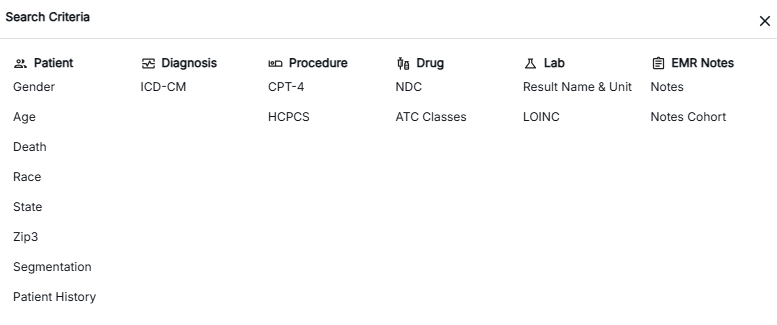
- Patient Demographics: Gender, Age, Death, Race, State, Zip3, etc.
- Diagnosis: ICD-CM, ICD-CM Simple, ICD-CM Hierarchy
- Procedures: ICD-PCS, CPT-4, CPT-4 Simple, HCPCS
- Drugs/Medications: NDC, ATC Classes
- Laboratory: Result Name & Unit, LOINC
- Clinical Notes: Notes, Notes Cohort
How Exclusion Works
- Step 1: Patients are first filtered based on Inclusion Criteria
- Step 2: From the included patients, those meeting Exclusion Criteria are removed
- Step 3: The final cohort contains only patients who meet inclusion AND do not meet exclusion criteria
Common Use Cases
- Remove confounding factors: Exclude patients with conditions that could affect analysis
- Age restrictions: Exclude pediatric or elderly patients
- Geographic filtering: Exclude patients from specific regions
- Medication conflicts: Exclude patients on certain medications
- Prior conditions: Exclude patients with pre-existing conditions
Best Practices
- Be specific with exclusion criteria to avoid over-excluding patients
- Test exclusion criteria incrementally to see their impact on patient count
- Review the final patient count to ensure it meets your analysis needs
- Document why each exclusion criterion is necessary
For more details about inclusion criteria and the complete cohort building process, click on the cards below: