Cohort Analytics Overview
Cohort Analytics is a powerful feature in LinQ Explorer that allows you to build and analyze patient cohorts. Define specific criteria to identify patient populations and gain insights through demographics, linked cohorts, line of therapy analysis, and SOW requests.
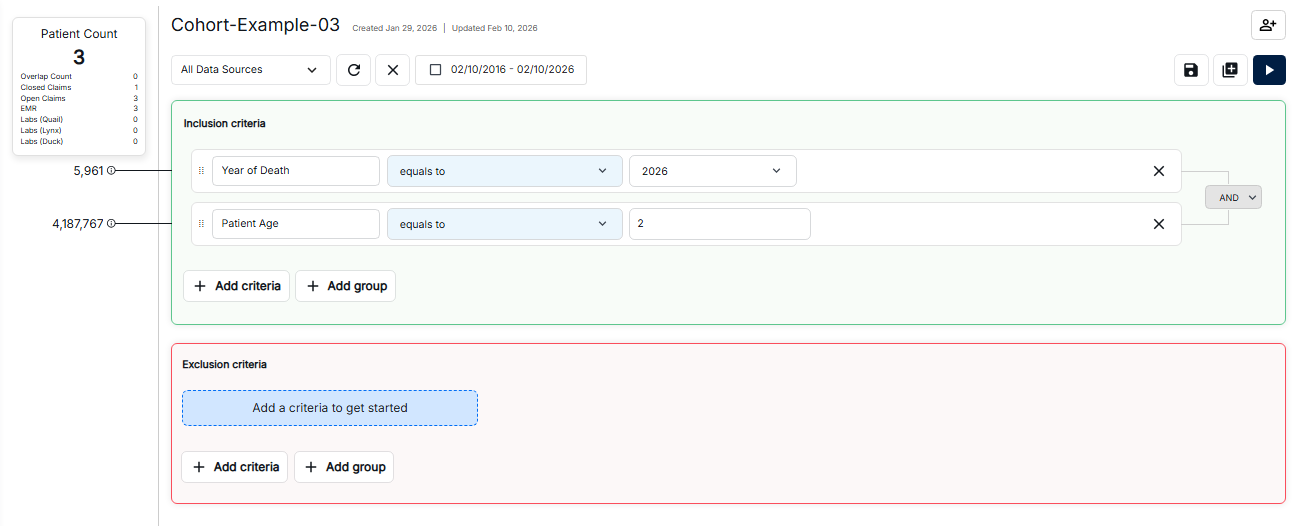
Understanding the Cohort Analytics Interface
The Cohort Analytics interface displays your cohorts in a list view with key information at a glance. From this screen, you can manage your cohorts and access detailed analytics.
Navigation Tabs
The interface includes navigation tabs for different analytics views:
- Linked Cohort: View and manage linked cohort relationships
- Patient Demographics: Analyze patient population characteristics
- Line Of Therapies: Explore treatment patterns and therapy lines
- SOW: Create and manage Statement of Work requests
Cohort List
The cohort list displays essential information for each cohort:
- Cohort Name: The name assigned to your cohort
- Patient Count: Total number of patients in the cohort
- Data Sources: Available data sources (Closed Claims, Open Claims, EMR)
- Created/Updated Date: When the cohort was created or last modified
Action Buttons
The toolbar provides quick actions:
- Save: Save your cohort changes
- Refresh: Reload the cohort data
- Export: Export cohort data for analysis
- Date Range: Filter cohort data by date range
Key Features
Cohort Analytics provides several powerful capabilities:
- Cohort Creation: Build cohorts using inclusion and exclusion criteria
- Criteria Management: Add diagnosis codes, procedure codes, demographics, and more
- Real-time Counts: See patient counts update as you refine criteria
- Data Source Filtering: Filter by specific data sources
- Analytics Views: Access demographics, linked cohorts, and therapy analysis
What You Can Do
With Cohort Analytics in the External Guide, you can:
- Create new cohorts with custom selection criteria
- Edit existing cohorts to modify their parameters
- View linked cohort funnel analysis
- Analyze patient demographics data
- Explore line of therapy patterns
- Submit SOW requests for data extracts